Cluster-Level Kubernetes Resilience: The Layer Below Your Deployment
Pod Disruption Budgets, topology spread, anti-affinity, node affinity, and resource quotas — the scheduling configs that keep your workloads alive when nodes go down, zones fail, or maintenance runs.
Your deployment config — rolling updates, probes, HPA — handles deploy-time safety. That’s one layer. There’s a second layer that most teams skip: what happens when a node goes down, a zone fails, or a cluster drain runs for maintenance.
These configs don’t live in your app. They live in how Kubernetes places and protects your pods across the cluster. Get them wrong and a routine node replacement takes your service offline.
1. Pod Disruption Budgets
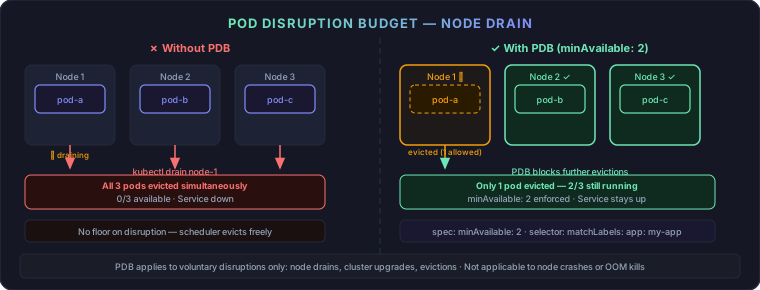
When Kubernetes drains a node — for maintenance, a cluster upgrade, or a spot reclamation — it evicts pods. Without a PDB, it can evict every replica at once.
apiVersion: policy/v1
kind: PodDisruptionBudget
metadata:
  name: my-app-pdb
spec:
  minAvailable: 2
  selector:
    matchLabels:
      app: my-app
minAvailable: 2 — At least 2 pods must stay running during any voluntary disruption. Kubernetes won’t evict another pod if doing so would drop below this floor.
maxUnavailable: 1 — Equivalent framing: at most 1 pod can be down at a time. Pick whichever makes your SLO easier to reason about.
Use minAvailable when you need an absolute count. Use maxUnavailable when you think in percentages.
Rule: any deployment with 2+ replicas needs a PDB.
Check it works:
kubectl get pdb -n your-namespace
The ALLOWED DISRUPTIONS column shows how many pods can be evicted right now. If it’s 0, the node can’t be drained — which is exactly the PDB doing its job.
PDBs only apply to voluntary disruptions: drains, evictions, autoscaler scale-downs. They do not protect against node crashes or OOMKills.
2. Pod Anti-Affinity
Anti-affinity keeps replicas of the same app off the same node. If a node dies and all your pods are on it, your service goes with it.
affinity:
  podAntiAffinity:
    requiredDuringSchedulingIgnoredDuringExecution:
      - labelSelector:
          matchExpressions:
            - key: app
              operator: In
              values: ["my-app"]
        topologyKey: "kubernetes.io/hostname"
requiredDuringScheduling — Hard rule. Pod stays Pending if no eligible node exists. Good for production where availability is non-negotiable.
preferredDuringScheduling — Soft rule. Kubernetes tries to spread but schedules anyway if it can’t. Use this when you have fewer nodes than replicas.
| Required | Preferred | |
|---|---|---|
| Enforcement | Hard — pod goes Pending | Soft — best effort |
| Risk | Pods stuck if no eligible node | Co-location possible under pressure |
| Use | Production, high availability | Dev, autoscaling clusters |
3. Topology Spread Constraints
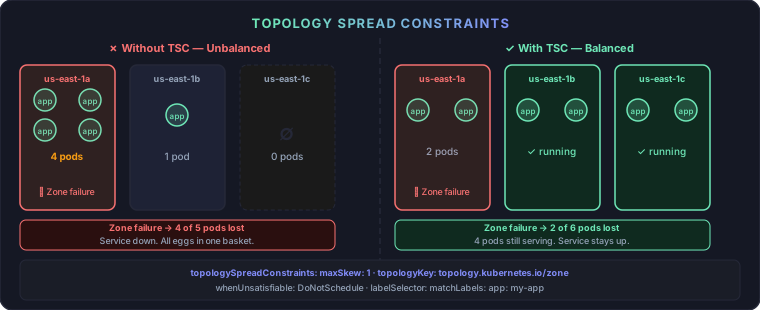
Anti-affinity spreads across nodes. Topology spread constraints spread across zones — with finer control and multiple constraint support.
topologySpreadConstraints:
  - maxSkew: 1
    topologyKey: topology.kubernetes.io/zone
    whenUnsatisfiable: DoNotSchedule
    labelSelector:
      matchLabels:
        app: my-app
maxSkew: 1 — The difference in pod count between any two zones can’t exceed 1. With 6 pods and 3 zones, you get exactly 2 per zone.
whenUnsatisfiable: DoNotSchedule — Pod stays Pending if the constraint can’t be met. Use ScheduleAnyway for softer enforcement in non-critical paths.
topologyKey — Can be zone, hostname, region, or any custom node label.
Combine constraints — zone spread AND node spread enforced together:
topologySpreadConstraints:
  - maxSkew: 1
    topologyKey: topology.kubernetes.io/zone
    whenUnsatisfiable: DoNotSchedule
    labelSelector:
      matchLabels:
        app: my-app
  - maxSkew: 1
    topologyKey: kubernetes.io/hostname
    whenUnsatisfiable: DoNotSchedule
    labelSelector:
      matchLabels:
        app: my-app
Multiple constraints are AND-ed: both must be satisfied. This gives you zone diversity and node diversity in one spec.
Prefer topology spread constraints over pure anti-affinity for zone-aware scheduling. They handle uneven zone sizes better and give you
maxSkewtuning.
4. Node Affinity and Taints
Two tools for workload placement. They solve different problems.
Node Affinity — attract pods to nodes
affinity:
  nodeAffinity:
    requiredDuringSchedulingIgnoredDuringExecution:
      nodeSelectorTerms:
        - matchExpressions:
            - key: node.kubernetes.io/instance-type
              operator: In
              values: ["m5.large", "m5.xlarge"]
Use for:
- Memory-heavy workloads on large instances
- Batch jobs on spot nodes
- GPU workloads on GPU nodes
- Regional placement for latency
Taints and Tolerations — repel pods from nodes
Taints mark a node as off-limits for most pods. Tolerations in a pod spec allow it to bypass the repel.
# Taint a node (e.g., spot instance pool)
kubectl taint nodes node1 lifecycle=spot:NoSchedule
# Pod spec toleration
tolerations:
  - key: "lifecycle"
    operator: "Equal"
    value: "spot"
    effect: "NoSchedule"
Taint effects:
| Effect | Behavior |
|---|---|
NoSchedule | New pods without toleration won’t be scheduled |
PreferNoSchedule | Soft version — scheduler avoids but doesn’t enforce |
NoExecute | Existing pods without toleration are evicted |
Use NoSchedule for dedicated node pools (infra, GPU, spot). Use NoExecute when you need to immediately clear a node of non-tolerating pods.
5. Resource Quotas and LimitRanges
Namespace-level caps prevent one team or runaway deployment from starving the cluster.
apiVersion: v1
kind: ResourceQuota
metadata:
  name: team-quota
  namespace: payments
spec:
  hard:
    requests.cpu: "4"
    requests.memory: "8Gi"
    limits.cpu: "8"
    limits.memory: "16Gi"
    pods: "20"
Without this, a misconfigured deployment can exhaust node capacity and starve every other workload on the cluster.
Pair with a LimitRange to enforce defaults — so pods without explicit resource specs still get sane values:
apiVersion: v1
kind: LimitRange
metadata:
  name: default-limits
  namespace: payments
spec:
  limits:
    - default:
        cpu: "500m"
        memory: "256Mi"
      defaultRequest:
        cpu: "100m"
        memory: "128Mi"
      type: Container
Without a LimitRange, a pod with no resource spec has unlimited CPU and memory requests of 0 — which causes scheduling anomalies and potential node starvation.
Putting It All Together
A complete production pod spec combining all layers:
apiVersion: apps/v1
kind: Deployment
metadata:
  name: my-app
spec:
  replicas: 6
  template:
    spec:
      affinity:
        podAntiAffinity:
          requiredDuringSchedulingIgnoredDuringExecution:
            - labelSelector:
                matchExpressions:
                  - key: app
                    operator: In
                    values: ["my-app"]
              topologyKey: "kubernetes.io/hostname"
      topologySpreadConstraints:
        - maxSkew: 1
          topologyKey: topology.kubernetes.io/zone
          whenUnsatisfiable: DoNotSchedule
          labelSelector:
            matchLabels:
              app: my-app
      tolerations:
        - key: "lifecycle"
          operator: "Equal"
          value: "spot"
          effect: "NoSchedule"
      containers:
        - name: my-app
          image: my-app:latest
          resources:
            requests:
              cpu: "250m"
              memory: "256Mi"
            limits:
              cpu: "500m"
              memory: "512Mi"
---
apiVersion: policy/v1
kind: PodDisruptionBudget
metadata:
  name: my-app-pdb
spec:
  minAvailable: 2
  selector:
    matchLabels:
      app: my-app
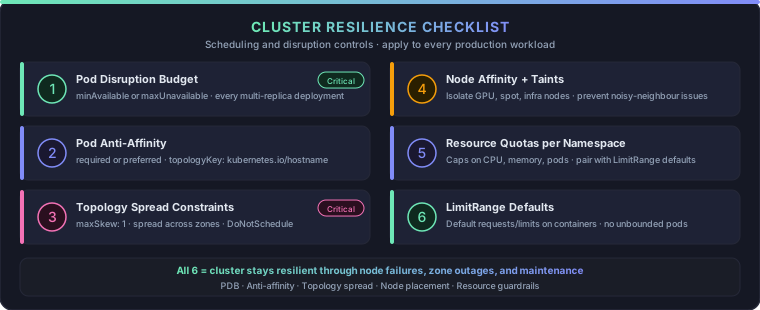
Cluster Resilience Checklist
Tools Worth Having
- DigitalOcean Managed Kubernetes (DOKS) — Managed control plane, node pool autoscaling, straightforward pricing. (affiliate link)
- Better Stack — Uptime monitoring + on-call alerting. Monitor cluster health endpoints so you catch disruption before users do. (affiliate link)
- Vultr Cloud Compute — Managed Kubernetes and bare-metal for full control at low cost. (affiliate link)
These aren’t optional extras. A deployment with zero-downtime rolling updates but no PDB can still go offline during a node drain. The two posts work together — deployment-level resilience handles deploy time, this one handles everything else.
Comments